Once your event is live, use tracking links to promote it and track who drives bookings.
Web
On the web, open the sidebar, click Events, find the event you want to promote, then click Tracking Links beneath it.
You'll see your own event tracking link, plus links for your Staff, Promoters, and custom attribution sources you created under Settings → Team → Attributions. See Managing attributions.
Bookings from these links are credited to that person or source in Sales by Attribution.
Print QR code on the event (from Actions or the event slide-out) is different. That code opens the same event page with no tracking ID, so those bookings show as None. Use tracking links when you want credit. See Viewing events.
To email tracking links to your team, open the ⋯ menu, click Email Links, choose recipients, add an optional note, and click Send.
Mobile
Open the sidebar, tap Events, then open the event.
Tap ⋯ in the header, then tap Share.
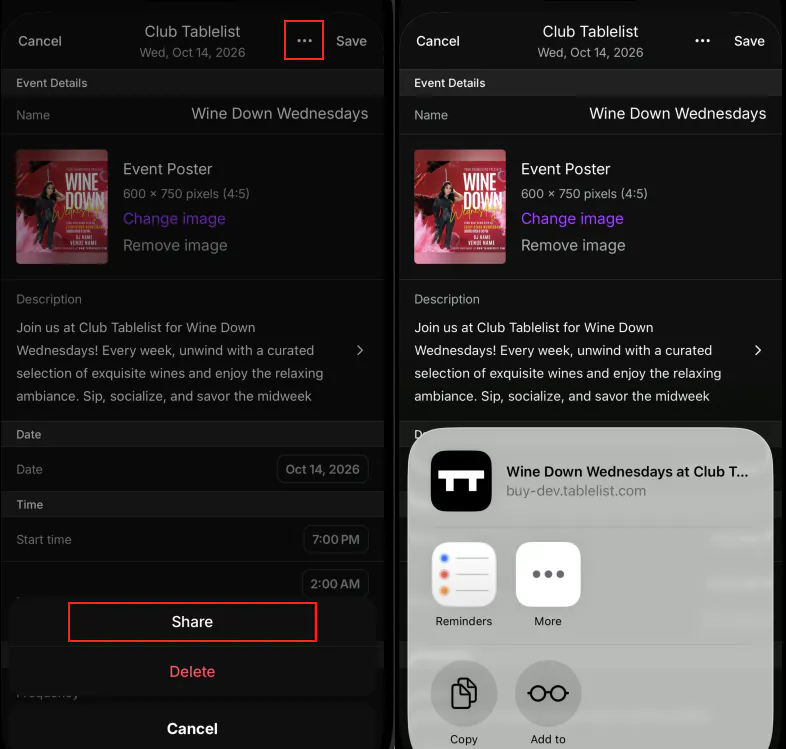
Copy, message, email, or send the URL. The link includes the logged-in account's tracking ID, so bookings are credited to that account.